
If you are using Google Apps or other calendars and cannot use the Amazon Chime for Outlook Add-in you can following the instructions below to include International and toll-free dial-in numbers.
See this article if you are using the Amazon Chime for Outlook add-in: https://answers.chime.aws/questions/127/how-do-i-include-dial-ins-for-other-countries-in-m.html
From within the Amazon Chime Desktop App
To add International dial-in numbers from within the Amazon Chime Windows, macOS, or web app:
- Choose Meetings > Schedule a meeting from launch pad
- In the Dial-in audio section, check the Dial-in option
- Select the countries you want to include
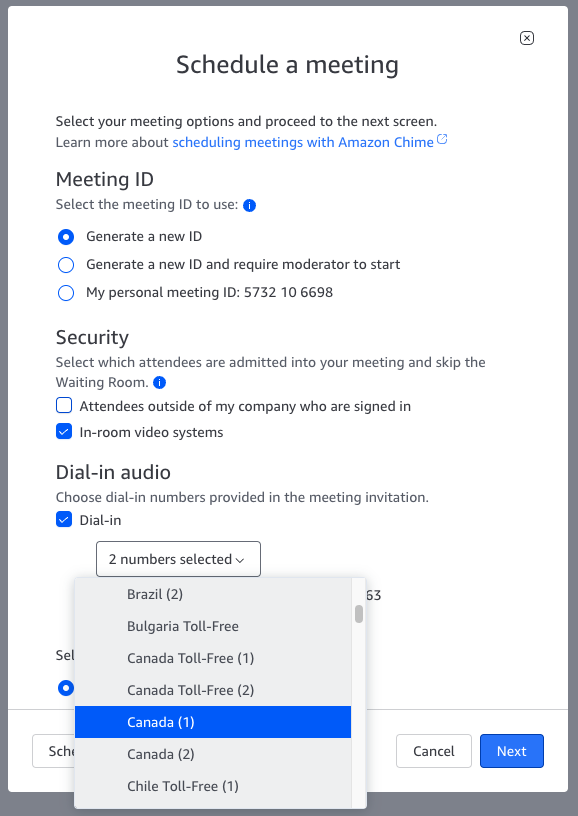
- Choose Next
- The numbers are added to the sample meeting instructions.
- Copy the instructions or select the numbers from the text box.
NOTE:
- You must have the Pro Trial or Pro permissions to access the International dial-in numbers.
- Please see https://aws.amazon.com/chime/dial-in-rates/ for the current list of countries and the dial-in rates.
- The Amazon Chime meeting attendee is responsible for any access or usage fees associated with their provider when dialing into a meeting.