
There are several ways to disconnect your audio after you have joined a meeting which vary depending on how you joined.
- When joined from a Windows, macOS, or web client:
- Choose the audio menu from the lower control bar and select Disable Mic & Speakers
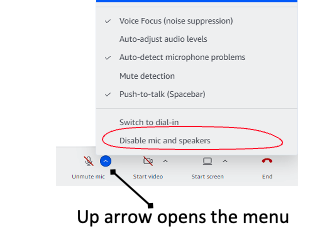
- Choose the audio menu from the lower control bar and select Disable Mic & Speakers
- When joined from an iOS or Android client
- Leave the call and join back in and choose the join option "Disable Mic & Speakers".