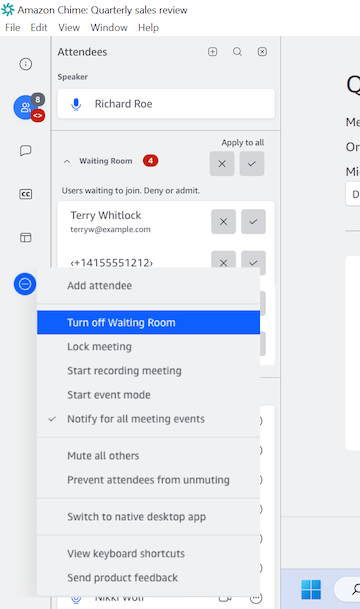
Waiting Room is a security feature that is turned on for all Amazon Chime meetings.
You cannot turn off the Waiting Room when scheduling your meetings or for all your meeting hosts.
The Waiting Room can only be turned off after the meeting has started but a host/delegate/moderator.
If you want to allow everyone in without requiring the Admit action for each, the host/delegate(s)/moderator(s) can choose Turn off Waiting Room from the More (...) menu (NOTE Authorized users do not have this host control).
- When you choose Turn off Waiting Room all attendees currently waiting are Admitted and new users will join the meeting directly without waiting
- If you subsequently choose Turn on Waiting Room new anonymous or restricted users joining will again wait to be admitted
- To prevent any other attendees who are not already in the meeting from joining, the host/delegate(s)/moderator(s) can use the Lock meeting action and only current attendees and invited attendees can join