
By default, meeting attendees are prompted to provide feedback at the end of every meeting that they attend using an Amazon Chime client. Feedback is useful as it helps the Amazon Chime team improve the experience and it is also a metric that is reported to your Organization's Amazon Chime Console dashboard. It can also be useful when reporting issues that you have with Amazon Chime.
You can turn off the Meeting Feedback prompt by doing the following:
[Windows, macOS, web]
- Return to the Main Amazon Chime window
- Click your name in the upper left and choose Settings from the menu
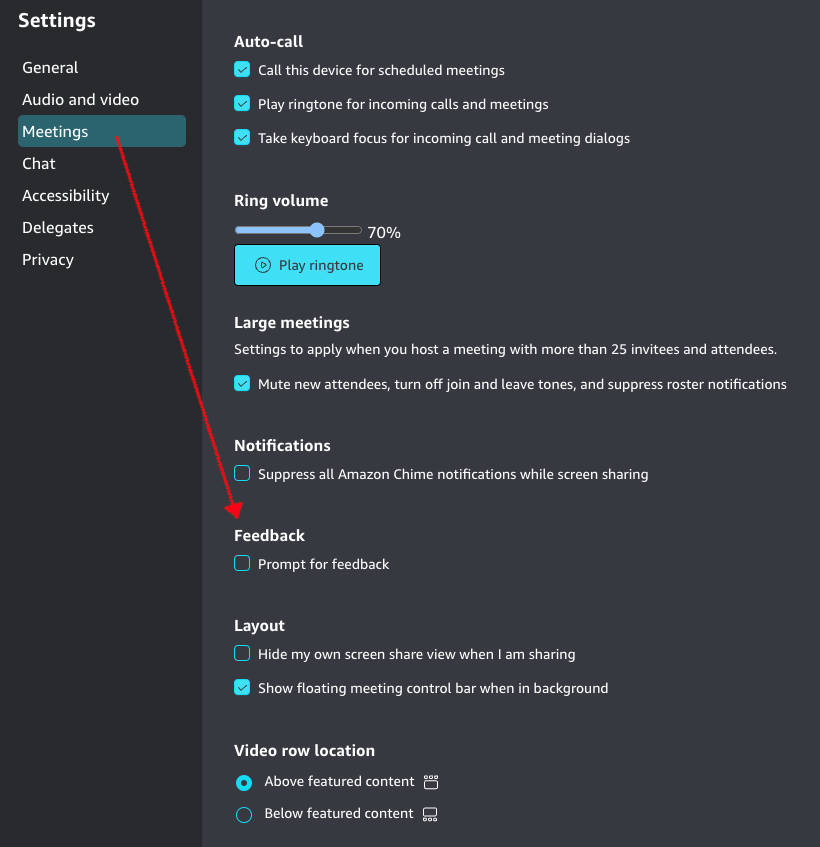
- Select Meetings
- Under the Feedback section, un-check the Prompt for feedback option
- Close the Settings by clicking the X in the upper right
[iOS, Android]
Go to the Settings section (gear icon in the upper left) and turn off Prompt for feedback. When you join and leave calls from this device you will not be prompted for feedback.